Atlas Agent
- Ref
- U4
- Category
- software
- Status
- in use
- Year
- 2026
- Sheet
- 1 of 4
- Rev
- C
A personal agent running on a Mac mini at home, built on Claude Code, that plans my training, keeps my calendar and notes in order, and runs a few dozen jobs for me every day.
Atlas is the agent I use and talk to every day, running on a Mac mini at home that stays on all the time. It’s built on Claude Code, and over the last couple of months it has slowly taken over a lot of the admin in my life: planning my training for a half Ironman around my calendar, keeping my reminders and calendar in order, drafting emails (which I then send myself), looking after my Obsidian vault and Anki decks, generating the Chinese handwriting sheets from xiehanzi, and more. Atlas also serves as my ‘brain buddy’, and while I’m generally against cognitive offloading to AI, it’s really helpful to have something to bounce ideas and thoughts off of, whenever and wherever I want to, that has full context of everything in my life and all of my projects. It also wrote this page, and opened the pull request it was published through.
Due to privacy and security reasons, I won’t be putting the code on GitHub. Most of what makes Atlas work is configuration that points straight at my health data, my mail and my notes, so I’ve explained it here instead, with some diagrams made just for this page.
What it does
Most of what it does falls into a handful of areas. For training, it reads the data from my watch, my Garmin and the app I log gym sessions in, plans the coming week every Sunday and adjusts each day’s session in the morning depending on how I slept and recovered. For my time, it keeps the calendar and reminders in order, places the training it planned into the gaps it actually fits in, and drafts replies to the emails that matter. For my notes and studying it looks after the vault, my Anki decks and the Supernote, including the daily handwriting sheets, and for the public side it drafts pages like this one for my websites.
Some of that happens when I ask, but a lot of it happens on its own, on a schedule or when something happens or changes, which is what the chapter on scheduled jobs is about.
What it connects to
| Area | Connected to |
|---|---|
| Training and health | Apple Watch (through the phone), Garmin, Hevy, a training database |
| Time | iCloud calendar and Reminders, three mail accounts (read and draft) |
| Notes and study | The Obsidian vault, Anki, the Supernote |
| Public | The four websites, through pull requests |
| Everything else | Weather, documentation lookup, a headless browser, etc. |
Each connection is a tool server that Claude Code talks to over MCP, most of them running on the mini itself. Altogether there are 8 MCP servers connected to Atlas with 242 tools between them, and the biggest one by far, with 119 tools for the training data, calendar, reminders and mail, has been around longer than Atlas itself (more on that in From Hermes).
Where it runs
All of it runs on the one Mac mini, which never sleeps and sits on my home network. The agent sessions are Claude Code processes started on the mini, the tool servers run beside them (some in Docker, some as small services of their own), and a scheduler and a listener, both plain launchd services, wake agents up when there’s work to do. The scheduled jobs also have their own long-lived login, so nothing I do in my own sessions can log them out.
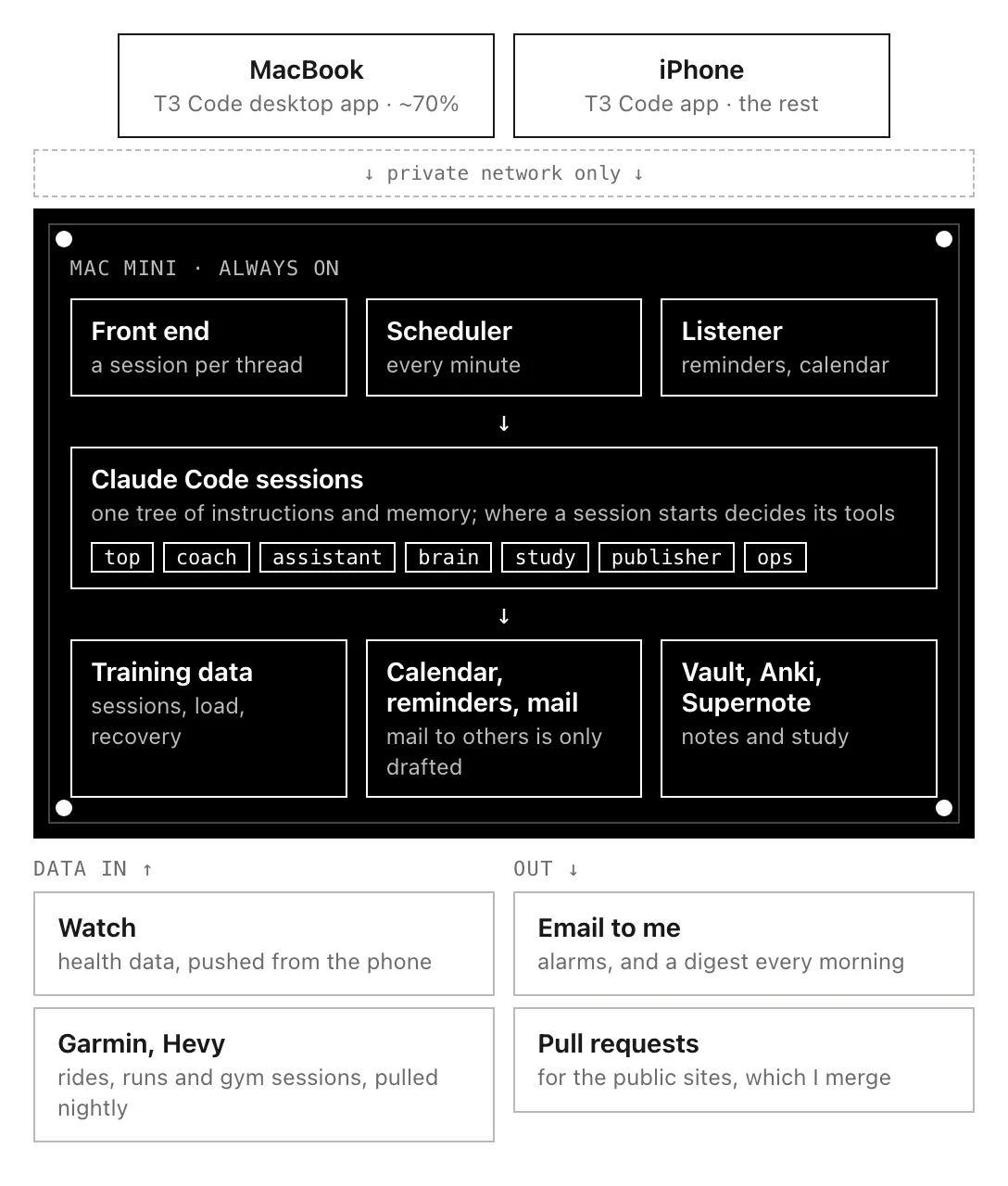
The whole system, roughly. Everything inside the black box runs on the one machine.
How it’s put together
All of the instructions sit in one git repository, with a smaller repository inside it for each area. Claude Code looks for its instruction files from the directory a session starts in upwards, so a session started at the top gets the shared instructions and every tool, while one started in, say, the coach directory gets the same shared instructions plus only the tools that training needs. As a result I never had to decide between one general agent and a few specialised ones, I just pick where to start a conversation.
| Started in | Used for |
|---|---|
| the top | Anything, with every tool |
| coach | Training and health |
| assistant | Calendar, reminders and mail |
| brain | The vault, Anki and the Supernote |
| a study directory | Exam prep |
| publisher | The public websites |
| ops | Fixing the system itself |
The main reason for the split is security, because a lot of Atlas runs without me watching, in scheduled jobs and triggers. An unsupervised run can’t stop and ask me for permission, so it can only use the tools its directory has approved in advance, and anything else is simply refused. As a result, a job reading my email in the assistant directory can see my training plan but not change it, and can draft replies but not send them, and if something in an email ever tried to talk an agent into doing something, the most it could reach is the small set of tools that one job was given. The permissions for every directory are generated from a single policy, with a test that fails as soon as a tool appears that nobody has sorted into allowed or denied. The smaller tool sets also help the model itself, since one with 65 loosely related tools in front of it tends to give up and use the shell, while one with a dozen relevant tools uses them properly. The last two directories are separate agents with their own jobs, which have their own chapter.
The areas don’t send each other messages either. When the coach decides what I’m training on a given day it writes the session into the training database, and the assistant picks it up from there when it plans my calendar, which leaves a record of the decision and works even if only one of the two is running at the time. Everything it knows about me long term is in a folder of small markdown files in git, one fact per file, which every directory reads.
How I talk to it
Mostly from my MacBook (about 70% of the time), and otherwise from my phone, both through T3 Code. The mini runs a T3 Code server, and the desktop app on the MacBook and the app on my phone connect to it over a private network, so the front end isn’t reachable from the public internet at all. Every thread I open starts a Claude Code session on the mini, in whichever directory I choose, and since T3 Code keeps the threads in its own database, a restart of the server doesn’t lose a conversation I’m in the middle of. The same apps can also run Codex with the same instructions and tools.
There are two other ways in that don’t involve a conversation at all. Anything I add to a reminders list called Atlas gets picked up within about a minute and handled as if I’d typed it, and alarms and a summary of the night’s jobs come back to me by email.
Chapters
- Scheduled jobs, the work it does without being asked, and how I know when something stops
- The technician and the publisher, the two agents beside Atlas, one fixing the system and one looking after my websites
- From Hermes, the first version of all this and why I replaced it
What it won’t do on its own
A few things always need a yes from me in the same conversation: sending email to anyone other than me, deleting things, publishing anything, and paying for anything. It also doesn’t write to my vault unless I’ve asked it to. Email in general is treated as something to read and never as instructions, since anyone can send it, while the Atlas reminders list counts as instructions because only I can write to it.
Revisions
| Rev | Date | Change |
|---|---|---|
| A | 2026-10-14 | First published, with three chapters. |
| B | 2026-10-28 | The main page listed as sheet 01, ahead of the three chapters. |
| C | 2026-11-11 | Retitled Atlas Agent. |